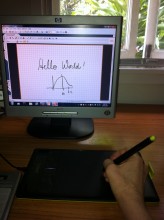
The bamboo tablet setup
The bamboo tablet is the simplest and cheapest way to get started on adding freehand diagrams and equations to your teaching content so you can record yourself and share these with all of your students.
Here is how it works. First you need to use the tablet with PDF Annotator. Then once you have mastered this (it wont take long) you can then use a headset and Screencast-O-Matic to record yourself writing, drawing and talking altogether so you can demonstrate ideas and problem solving for students. You can then save these recordings to a URL and insert this URL into your Blackboard page or email it to share it with others.
Take a look at the infographics, or watch the YouTube video below showing you how to use the tablet, then PDF Annotator, then how to record with Screencast-O-Matic
bamboo-plus-recording-infographic
YouTube Video:
http://www.youtube.com/watch?v=qrol8clb040
Here re some examples of recordings made by Civil Engineering lecturers and others
Explaining high-school mathematics using tablet, PDF Annotator and Screencast-O-Matic, which has been then saved on the Screencast-O-Matic site
fractions and equivalence on Screencast-O-Matic
Using Screencast-O-Matic to record webpages and How-To’s
http://www.screencast-o-matic.com/watch/cIiZVUVzxN
Note you can use the tablet with other tools such as:
Adobe Acrobat PRO (to markup pdf documents instead of PDF Annotator)
https://www.youtube.com/watch?v=YamjcL4k-fA
PowerPoint (you can use the tablet it to edit your PowerPoint slides during or after classes)
https://www.youtube.com/watch?v=Iob1_2GHorE
PhotoShop and Illustrator (for the artists and cartoonists)
Photoshop
https://www.youtube.com/watch?v=dAIdat9LaOk
https://www.youtube.com/watch?v=RcDTYM5PWqA
Illustrator
 Sharing Diagrams Online